~/projects / screencaster
Screencaster
Write a YAML script, run one command, get a narrated MP4 of a website. Renders run in Docker with Playwright, offline Piper voices and ffmpeg; an MCP server lets Claude Code create demos from chat.
- role
- design and implementation: Go CLI, MCP server, render pipeline
- time
- Oct 2026
- type
- personal
- stack
- Go · Playwright · Piper TTS · ffmpeg · SQLite · MCP · Docker
01 / problem
Demo videos never get made
Recording, voiceover and editing by hand cost too much, so release notes ship without video. Every UI change would mean recording again.
02 / solution
A demo is a script, not a recording
A demo is described in plain language, Claude Code writes it as a YAML script, and the CLI or MCP server renders it. Playwright performs the steps in a browser, a local Piper voice narrates each step as its action starts and ffmpeg assembles the MP4. Rendering makes no LLM call, so the same script replays the same demo, and a UI change means fixing one step and rendering again.
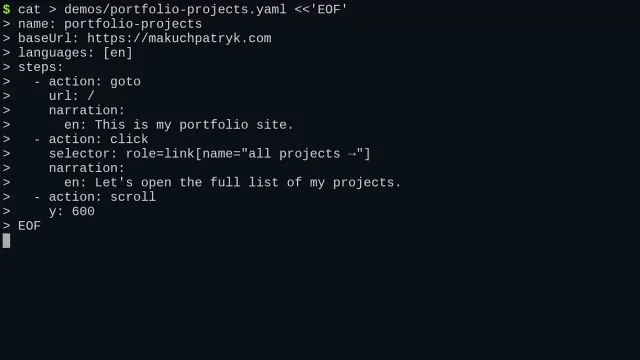
The YAML script, typed in the terminal: one step per action, with optional narration
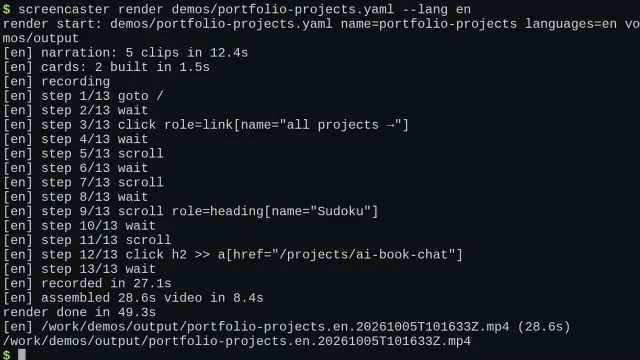
One command renders it: narration, recording and assembly run step by step
03 / architecture
How it works
A single Go module with a layered internal/ tree: pure domain rules, use cases behind ports, and one adapter per external tool (Playwright, Piper, ffmpeg, SQLite, MCP). The screencaster CLI and the MCP server share one render pipeline, and everything runs in one Docker image.
04 / results
Outcome
05 / lessons
What I learned
- Keeping rendering free of LLM calls makes a demo a replayable artifact: same script, same steps, same timing.
- One process and one SQLite file are enough for a tool a single developer runs, so the design skips scaling concerns.